TradeBotPro
Scanning stocks & crypto 24/7 — right now

Your First Automated
Trading Bot.

Running in 15 Minutes.

TradeBotPro connects to your Alpaca account and scans stocks and crypto 24/7 using 15 proven strategies — no coding, no manual watching, no complexity. Start in Paper Trading mode with zero risk, then go live when you're ready.

No Coding Required
Instant Backtesting
Risk Management Built-In
Cancel Anytime
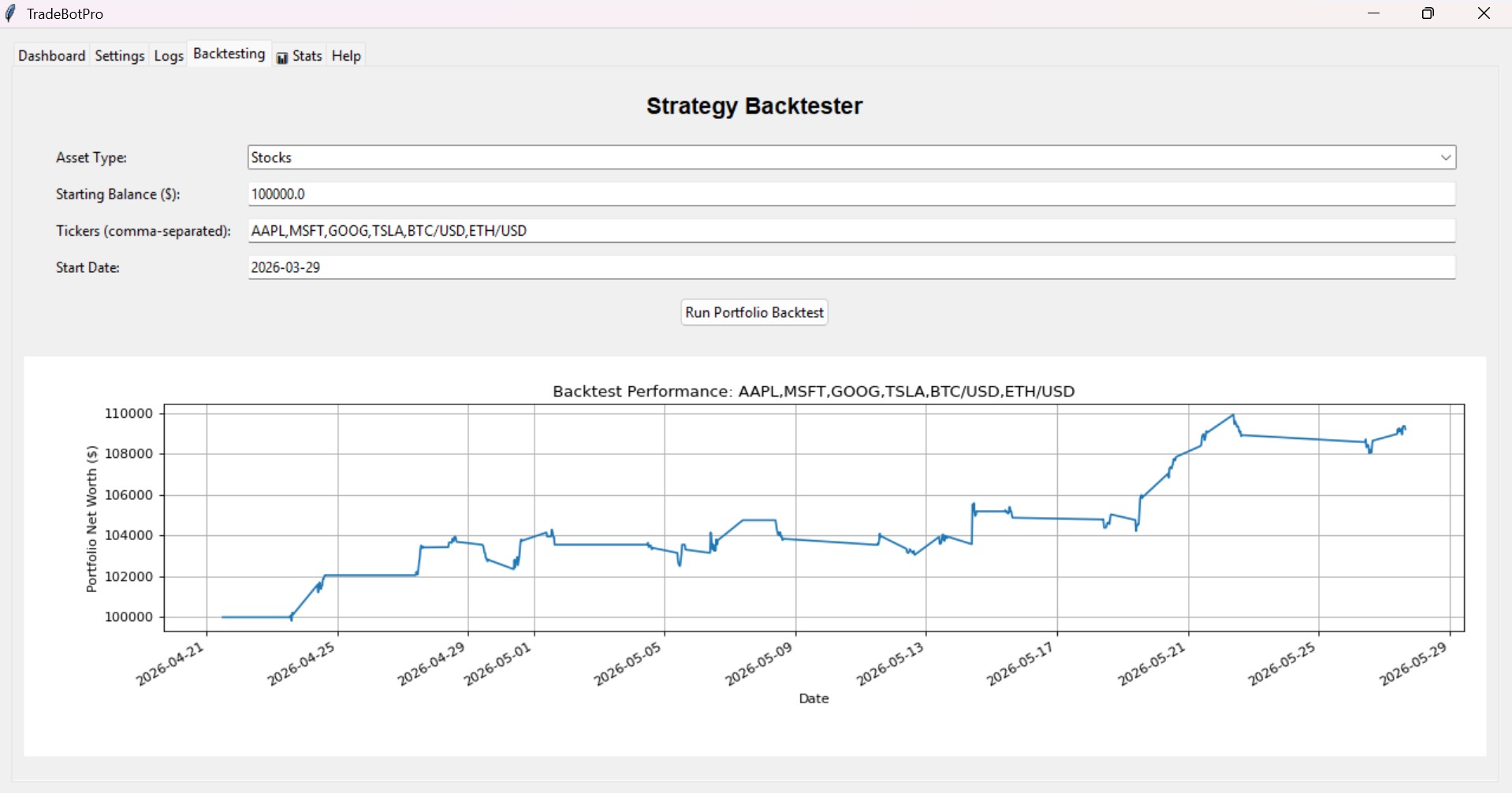
TradeBotPro Strategy Backtester showing portfolio growth

*Actual screenshot of the Strategy Backtester showing portfolio equity curve.

Up and Running in 3 Steps

No developer needed. No complex setup. Just connect and click Start.

1

Connect

Sign up at alpaca.markets (free) and paste your API keys into the bot. Takes 5 minutes.

2

Configure

Choose your asset type (Stocks or Crypto), set your risk amount, and select which of the 12 strategies to run.

3

Start

Click Start Bot. It scans the market every 5, 15, or 30 minutes and trades for you — automatically.

Why TradeBotPro?

Everything a serious trader needs — in a Windows app you can launch in minutes.

Never miss a crypto move — the bot runs 24/7 even when the stock market is closed

Full support for both stocks and crypto (BTC/USD, ETH/USD, and more). When equities close at 4 PM, the bot keeps scanning crypto around the clock.

"Set it up once. It runs while you sleep."

15 strategies. You pick which ones run. No coding required. NEW

Trend Pullback, Mean Reversion, Momentum Cross, Golden Cross, VWAP Reversion, RSI Divergence — enable any combo with a checkbox. Choose 5-min, 15-min, or 30-min candles.

"Day trade on 5-minute candles or swing trade on 30-minute candles — same bot, one setting."

Test before you risk a dollar — backtest any strategy on 60 days of real data

Run the Portfolio Backtester on any stock or crypto ticker. See a visual equity chart plus Win Rate, Sharpe Ratio, and Max Drawdown before you go live.

"Validate 'Crypto Breakout' on BTC/USD over 60 days — before risking a single dollar."

Restart your PC anytime. Your open trades and P&L are always saved.

All positions, pending orders, and daily P/L are stored in a local SQLite database. Close the bot, restart — it picks up exactly where it left off.

"Hold swing trades over the weekend without losing state."

Watch your positions update live — no refreshing, no switching tabs

Real-time WebSocket feed updates your P/L percentage live on the dashboard. See entry price, current price, stop loss, and target all in one view.

"Your P/L ticks up in real-time — without ever leaving the app."

Set a daily loss limit. The bot stops itself if things go wrong.

ATR-based position sizing, daily stop-loss, daily profit target, and now a Trailing Stop that locks in profits automatically as price rises.

"Risk $50 per trade — the bot sizes positions differently for volatile vs. quiet stocks."

📊 Stats Tab — Win Rate, Sharpe Ratio & Trade Journal NEW v20

The dedicated Stats tab shows your total trades, win rate, Sharpe ratio, max drawdown, and average gain/loss. Export your full trade history to CSV with one click.

"Know exactly how you're performing — not just what you feel."

Trailing Stop Loss — lock in profits automatically NEW v20

Enable the trailing stop to move your stop to breakeven once a trade is profitable, then trail it below the rolling high — protecting gains without cutting winners short.

"Up 2%? Stop moves to breakeven. Up 5%? Stop trails below your high."

RSI Divergence — the reversal signal pro traders watch NEW v20

Detects when price makes a lower low but RSI makes a higher low — a powerful early signal that selling pressure is weakening. Works on stocks and crypto.

"Catch bounces before the crowd — using divergence that most retail traders miss."

Simple, Transparent Pricing

Start small. Upgrade when you're ready. Cancel anytime.

Lite

Best for beginners exploring automation

$49.99

One-time payment · Lifetime access

  • Lifetime access — pay once
  • Stocks-only trading
  • Single strategy (Trend Pullback)
  • Basic risk management
  • No crypto trading
  • No backtesting module
  • No Stats & Performance tab
  • No trailing stop loss
MOST POPULAR

Pro

Everything — for serious traders

$25/week

Try for a week — cancel anytime

Or get lifetime access for

  • Everything in Lite
  • Stocks & 24/7 Crypto trading
  • 12 strategies — enable any combo
  • Multi-timeframe (5m, 15m, 30m)
  • Portfolio Backtester + Sharpe/Drawdown
  • 📊 Stats tab with Sharpe & Win Rate
  • Trailing Stop Loss
  • RSI Divergence strategy
  • Persistent state (SQLite DB)
  • Real-time WebSocket dashboard

No commitment. Cancel from your account page any time.

Frequently Asked Questions

Everything you need to know before getting started.

Do I need to know how to code?

No. TradeBotPro is a downloadable Windows application. You install it like any other program, enter your Alpaca API keys, and click Start. Zero coding required at any step.

What is Alpaca? Do I need an account?

Alpaca is a free, commission-free brokerage API. You sign up at alpaca.markets, complete identity verification, generate your API keys, and paste them into TradeBotPro. You can start in Paper Trading (fake money) mode for free with no deposit required.

Is my money at risk?

Paper Trading mode uses completely fake money — nothing is at risk, no deposit required. The bot will only trade with real money if you explicitly select "Live Trading" in Settings and confirm the warning prompt. We strongly recommend starting in Paper Trading to learn the bot's behavior first.

What if the bot makes bad trades?

You set a Daily Stop-Loss Limit in Settings. If the bot loses more than that amount in a single day, it automatically stops placing new trades. Every trade also has an individual stop-loss based on ATR, so no single trade can blow up your account. The "Force Sell All" button on the dashboard lets you exit everything instantly.

Does it work on Mac?

Currently Windows 10 and Windows 11 only. Mac support is on our roadmap. If you need 24/7 operation without keeping your PC on, consider running the bot on a Windows VPS (Virtual Private Server).

Do I need to keep my computer on?

Yes — the bot runs on your local machine. If you close it, it stops. Your open positions and P/L are saved to a local database, so nothing is lost when you restart. For 24/7 crypto trading, a Windows VPS running the bot 24/7 is the best solution.

What is the Trailing Stop and why does it matter?

A trailing stop automatically moves your stop-loss upward as a trade becomes profitable. For example: if a stock rises 1%, your stop moves to breakeven (you can't lose). As it keeps rising, the stop trails below the highest price — locking in more profit without cutting your winner short. It's one of the most powerful risk tools available to retail traders.

Ready to automate your trading?

Start with Paper Trading — no money at risk. Go live when you're confident.

Or

⚠ Risk Disclosure & Liability Waiver

Please read carefully before proceeding.

TradeBotPro is a software tool, not a financial advisor. We do not provide personalized investment advice.

All sales are final. Trading in financial markets carries a high level of risk. TradeBotPro is provided "as is" without any warranties. We do not guarantee any profits or protection against losses. Past performance is not indicative of future results.

By using TradeBotPro, you acknowledge that the developers, distributors, and affiliates shall not be liable for any damages including loss of profits, resulting from the use or inability to use the software. It is your responsibility to understand the risks and manage your capital appropriately.

Windows PC Only Windows 10/11 Compatible